BUSINESS PROCESS MANAGEMENT

Found this helpful? Share it with peers.
Introduction
Process automation has become one of the most effective levers for improving operational efficiency, reducing errors, and freeing up valuable employee capacity. As part of broader business process management initiatives, organizations increasingly rely on automation to standardize execution, improve transparency, and scale operations.
However, not every automation initiative delivers value.
One of the most common mistakes organizations make is jumping straight into automation technologies without first understanding which processes should be automated, how mature they are, and which automation approach actually fits the use case. Automating an inefficient or poorly designed process does not fix the problem – it amplifies it.
This guide provides a practical, step-by-step framework for successful process automation. It focuses on how to approach automation systematically, from identifying the right candidates to monitoring results after go-live, with a strong emphasis on low-code / no-code automation.
In this guide, you will learn:
-
Which processes are best suited for automation
-
How to avoid common automation pitfalls
-
A proven 7-step framework for sustainable process automation
-
How to achieve measurable results with limited resources
What is process automation?
Process automation refers to the use of technology to execute recurring business processes with minimal manual intervention. Its goal is not simply to replace human work, but to make processes faster, more reliable, and easier to scale.
In practice, process automation works best when it is applied to well-defined and stable processes. Automating unclear or poorly documented processes usually leads to errors being executed faster, rather than real efficiency gains.
Effective process automation typically focuses on tasks that are repetitive, rule-based, and time-consuming. When implemented on top of a solid process foundation, automation helps organizations reduce errors, improve throughput, and free up employees for higher-value work.
In short: process automation turns clearly defined processes into consistently executable workflows supported by the right technology.
In short, process automation:
-
Reduces manual effort and rework
-
Increases speed and consistency
-
Improves transparency and traceability
-
Supports scalability without proportional cost increase
Why automate processes?
Organizations automate processes to handle growing complexity without increasing operational effort at the same pace. As volumes rise, systems multiply, and teams scale, manual execution quickly becomes a bottleneck.
Process automation helps organizations execute work more consistently and predictably. It reduces dependency on individual availability, minimizes manual errors, and ensures that defined rules are applied the same way every time a process runs.
In practice, business process automation is most valuable when it supports processes that are already understood and standardized. When automation is introduced at the right time, it becomes a powerful lever for efficiency, quality, and scalability.
Key reasons organizations automate processes include:
-
To reduce manual effort and repetitive work
-
To improve speed and consistency of execution
-
To minimize errors and rework
-
To support growth without proportional cost increases
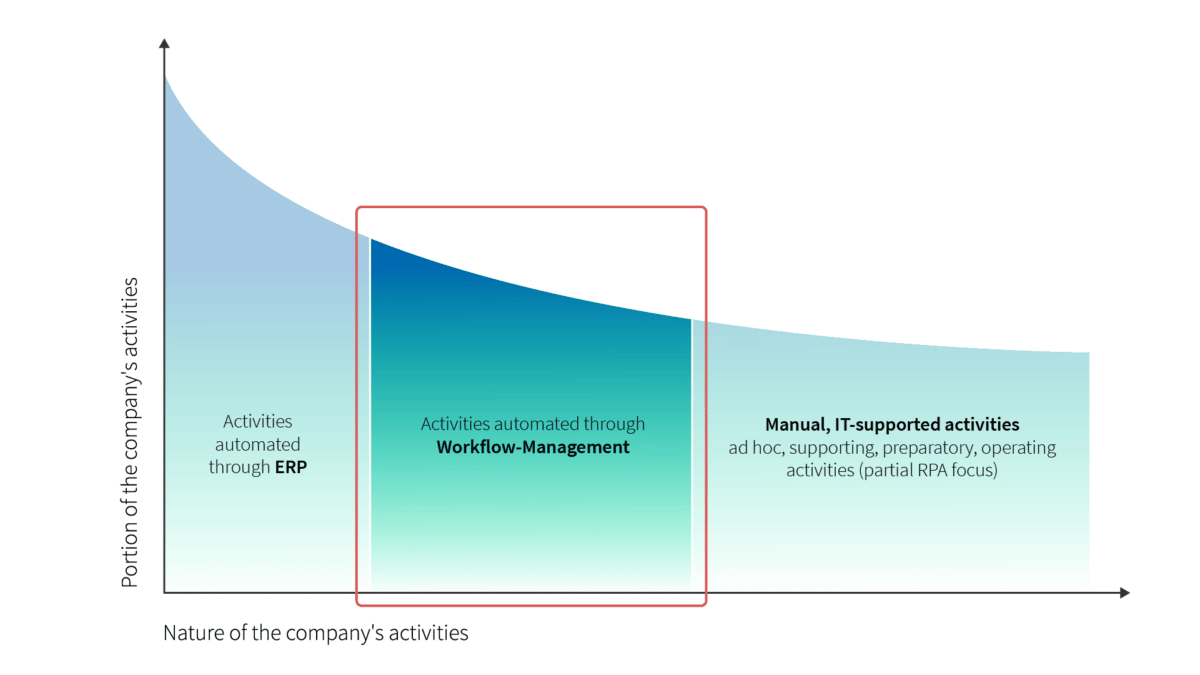
Figure: Activities for automation in Organisations1
When should you automate a process?
A process should be automated only after it is clearly understood and sufficiently stable. Automation is not a starting point—it is a scaling mechanism. Automating too early often leads to rigid solutions built on unclear workflows. Before any automation project, it pays to first how to optimize processes systematically.
In practice, the right moment to automate is when a process:
-
occurs frequently,
-
follows clear rules,
-
and shows recurring manual effort or error potential.
At this stage, automation can reduce operational load while improving consistency and reliability.
Indicators that a process is ready for automation
-
The process is repetitive and executed regularly
-
Steps, rules, and exceptions are clearly defined
-
Inputs and outputs are standardized
-
Manual execution causes delays, errors, or rework
-
Process performance can be measured
When automation is usually a bad idea
Not every process should be automated. Automation often fails when:
-
the process is still changing frequently
-
responsibilities are unclear
-
exceptions dominate the normal flow
-
documentation is missing or outdated
In such cases, improving and stabilizing the process should come before automation.
Which processes are suitable for automation?
Not all processes benefit equally from automation. The best candidates are processes that are stable, repetitive, and clearly structured. Automating such processes reduces effort without introducing unnecessary complexity.
In practice, organizations achieve the best results when they start with processes that already run reliably, but consume significant manual effort or are prone to human error.
Characteristics of good automation candidates
-
High execution frequency
-
Rule-based decision logic
-
Clearly defined inputs and outputs
-
Limited number of exceptions
-
Measurable performance indicators
Processes with these characteristics typically deliver quick and sustainable automation benefits.
Processes that should not be automated first
Some processes look attractive for automation but create more problems than value when automated too early:
-
Processes with unclear ownership
-
Highly variable or ad-hoc workflows
-
Processes that are still being redesigned
-
Activities dominated by human judgment
In these cases, process clarification and documentation should come first.
Why prioritization matters
Starting with the wrong processes can undermine trust in automation initiatives. Selecting suitable candidates early helps demonstrate value, build confidence, and create momentum for further automation efforts.
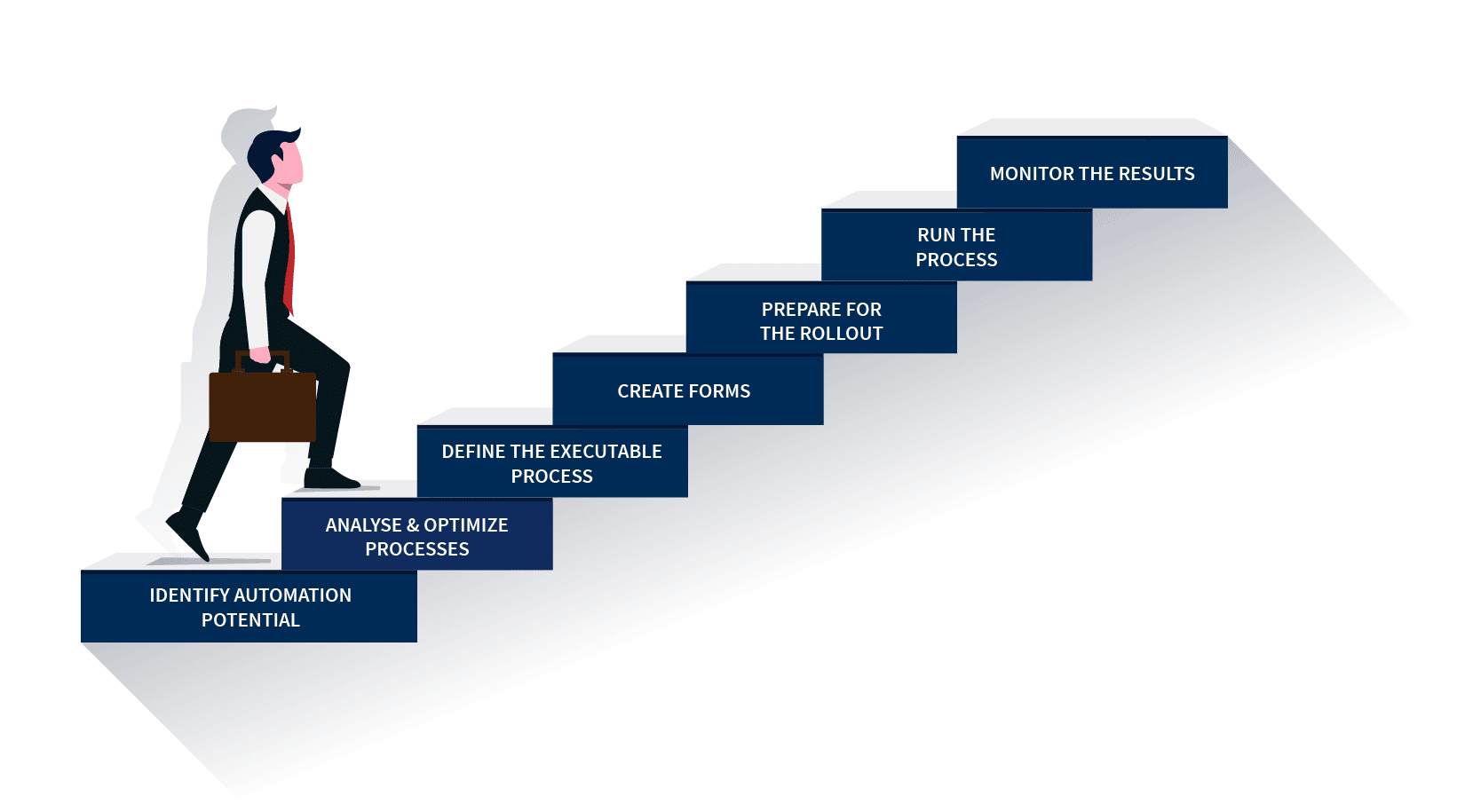
Figure: 7 steps to successful process automation
How to automate a process in 7 steps
Effective process automation follows a clear sequence. Skipping steps or changing the order often leads to fragile solutions that are hard to maintain or scale.
The following seven steps reflect a proven and practical approach to process automation.
1. Understand and document the process
Before automating anything, the process must be clearly understood and documented. This includes defining activities, roles, rules, inputs, outputs, and relevant exceptions.
Automation without proper documentation usually accelerates existing problems instead of solving them.
2. Identify automation potential
Not every activity benefits equally from automation. The goal of this step is to identify which parts of the process are repetitive, rule-based, and time-consuming, and where automation can create real value.
The first rule of any technology used in a business is that automation applied to an efficient operation will magnify the efficiency. The second is that automation applied to an inefficient operation will magnify the inefficiency.
– Bill Gates
3. Define automation objectives
Clear objectives help keep automation focused. Typical goals include reducing processing time, minimizing errors, increasing transparency, or freeing up employee capacity for higher-value work.
Without defined objectives, automation initiatives often become overly complex or difficult to measure.
4. Select the appropriate automation approach
Different processes require different automation approaches. Depending on the use case, this may involve workflow automation, system integration, or RPA — understanding the distinction between BPA vs RPA helps teams choose the right fit for each scenario.
The automation approach should always follow the process design—not the other way around.
5. Design and implement the automated workflow
In this step, the automated workflow is designed and implemented based on the defined process and automation approach. Testing with realistic scenarios is essential to ensure stability and correct handling of exceptions.
6. Test and validate the automation
Before full rollout, the automation should be validated with real users and real data. This helps identify gaps, edge cases, and usability issues that may not appear during initial implementation.
7. Monitor, maintain, and continuously improve
Automation is not a one-time effort. Monitoring performance, handling changes, and continuously improving the automated process are essential to ensure long-term value and scalability.
Why this 7-step approach works
Each step builds on the previous one and ensures that automation is based on a solid process foundation. Skipping steps often results in brittle solutions that are difficult to adapt as requirements change.
Common process automation challenges and mistakes
Many process automation initiatives fail not because of the technology, but because fundamental prerequisites are ignored. In practice, the same patterns appear again and again—across industries and company sizes.
Automating unstable or unclear processes
One of the most common mistakes is automating processes that are still changing or poorly understood. Automation amplifies structure—but it also amplifies chaos.
When processes are unclear, automation locks in problems instead of solving them.
Focusing on tools instead of processes
Automation projects often start with tool selection rather than process analysis. This leads to solutions that are technically impressive but misaligned with how work actually happens.
Successful automation always starts with process clarity, not software capabilities.
Ignoring exceptions and edge cases
Many processes work smoothly most of the time—but automation fails when exceptions are not properly considered. Ignoring these cases often results in manual workarounds that undermine automation benefits.
Lack of ownership and long-term maintenance
Automation is frequently treated as a one-off project. Without clear ownership and ongoing maintenance, automated processes quickly become outdated as requirements change.
Underestimating change management
Even well-designed automation can fail if users are not involved early or properly supported. Resistance often arises when automation is perceived as imposed rather than enabling.
How to avoid these pitfalls
Most automation challenges can be avoided by:
-
stabilizing and documenting processes first
-
involving process owners and users early
-
starting small and scaling gradually
-
treating automation as a continuous improvement effort
Tools for process automation
The success of process automation depends not only on what is automated, but also on how automation is supported over time. Different tools serve different purposes along the automation lifecycle.
Rather than focusing on specific products, it is more useful to understand which type of tool supports each automation need.
Process modeling and documentation tools
These tools help define and structure processes before automation begins. They ensure that activities, roles, rules, and dependencies are clearly documented and consistently maintained.
Without this foundation, automation initiatives often struggle to scale or adapt.
Workflow and automation tools
Workflow engines and automation platforms execute predefined process logic. They support task orchestration, system integration, and rule-based decision-making.
These tools are most effective when they build on well-documented and stable processes.
Monitoring and governance tools
Automation introduces new dependencies and risks. Monitoring and governance tools help track performance, ensure compliance, and manage changes over time, preventing automated processes from becoming black boxes.
Choosing the right automation platform
No tool can compensate for unclear processes or missing ownership. However, organizations looking to automate processes sustainably benefit from integrated platforms that connect process documentation, automation, and governance.
Solutions such as ADONIS support this integrated approach by combining process modeling, documentation, analysis, and continuous improvement—creating a stable foundation for automation at scale. ADONIS BPM Tool
Summary
Successful process automation starts with clarity. Organizations that invest time in understanding, documenting, and stabilizing their processes create the the solid foundation needed for automation to deliver real and lasting value.
Throughout this guide, we’ve shown when automation makes sense, which processes are suitable, and how to approach automation step by step using a structured, practical framework. When automation is treated as a continuous improvement effort rather than a one-off project, it becomes a powerful enabler of efficiency, consistency, and scalability.
Ultimately, the goal of process automation is not to automate for its own sake, but to create processes that are easier to run, easier to improve, and easier to scale. With the right foundation, clear ownership, and suitable tools in place, automation can evolve from a technical initiative into a sustainable operational advantage.


Already got our weekly updates?