BUSINESS PROCESS MANAGEMENT

Found this helpful? Share it with peers.
Business process automation is often seen as a quick path to efficiency. Yet automation is not simply about speeding things up. It changes how work moves through an organization — and is one of the most impactful capabilities within business process management.
When applied thoughtfully, it creates clarity and consistency. When applied without structure, it can introduce new complexity.
This guide clarifies what business process automation truly involves, how it differs from related approaches, and what it takes to deliver meaningful results.

What Defines Business Process Automation in Practice?
Business Process Automation is not simply about replacing manual work with software. It is about ensuring that an entire workflow follows a defined and controlled path from start to finish.
In practice, this means that processes are clearly structured, decision logic is defined, responsibilities are assigned, and systems are connected so that information flows automatically between them. Automation should not operate in isolation. It should reflect how the organization intends work to be performed.
When these structural elements are in place, automation becomes predictable and manageable. Without them, it often turns into disconnected technical solutions that are difficult to oversee or scale.
What Are the Strategic Benefits of Business Process Automation?
When applied to well-designed processes, Business Process Automation delivers clear value beyond simple efficiency gains.
1. Operational Efficiency
Reduces manual coordination and shortens cycle times by ensuring tasks move automatically between systems and stakeholders.
2. Error Reduction
Minimizes manual data entry and eliminates inconsistencies caused by informal handovers or unclear responsibilities.
3. Scalability
Enables higher transaction volumes without proportional increases in headcount or administrative overhead.
4. Governance and Compliance
Ensures workflows follow defined rules and policies, improving traceability and audit readiness.
5. Data Visibility
Generates structured process data that supports monitoring, performance analysis, and continuous improvement.
Strategically, BPA enables organizations to move from reactive execution to proactive process management.
How Do You Decide Which Processes to Automate?
Not every process benefits from automation. Selecting the right automation candidates is critical to achieving measurable impact.
Strong automation candidates typically share several characteristics:
-
High repetition
-
Rule-based decision logic
-
High transaction volume
-
Predictable process paths
-
Measurable performance indicators
Beyond these criteria, stability is essential. Processes that frequently change, lack clear ownership, or rely heavily on judgment and exceptions are rarely suitable for immediate automation. Analyzing workflows – for example, through process mining or structured review – helps ensure that automation strengthens performance rather than embedding existing inefficiencies into software logic.
Learn more about how to identify automation candidates in your business processes.
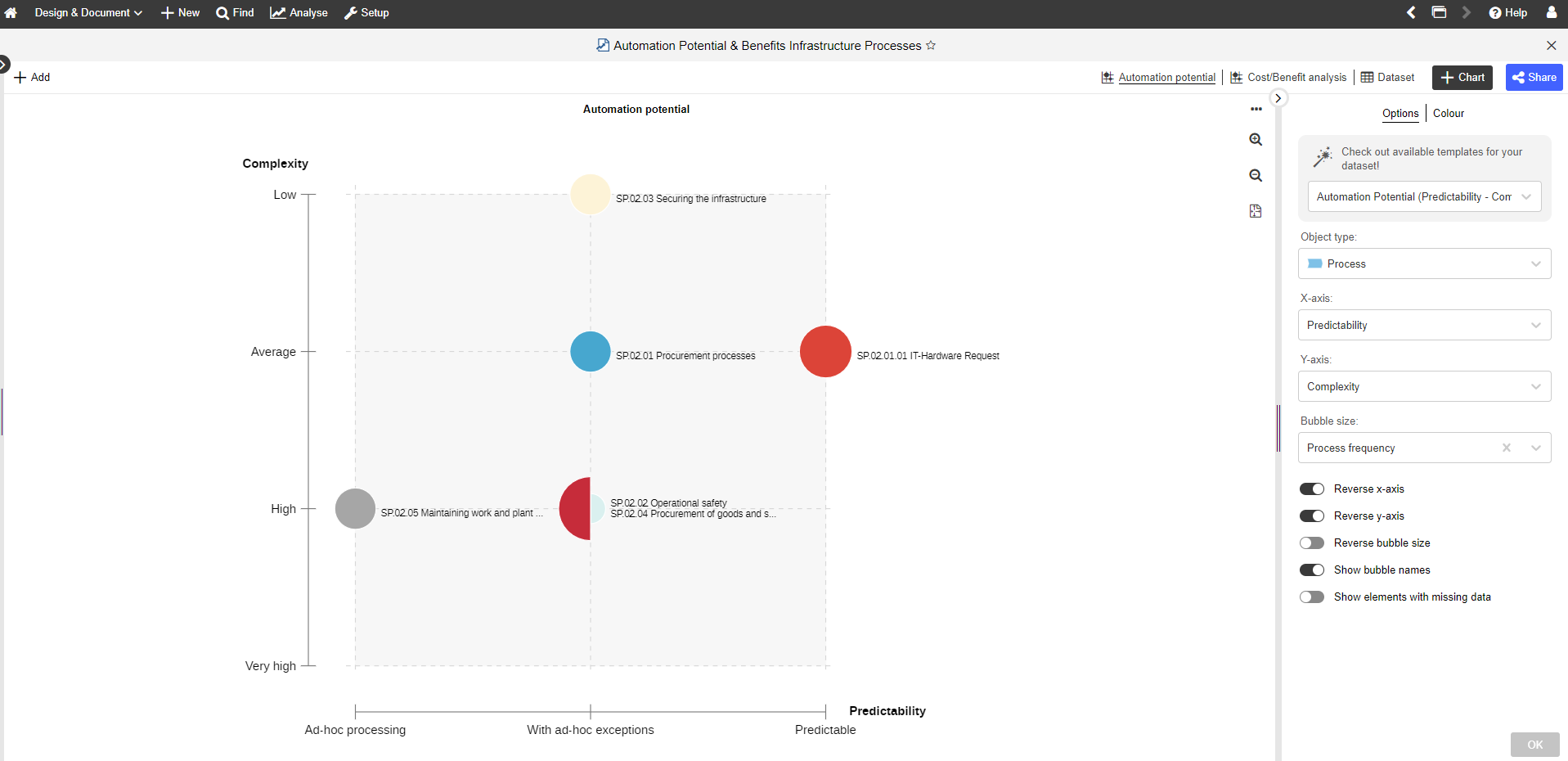
Example of process portfolio analysis in ADONIS BPM tool
What Does Successful Process Automation Require?
Selecting the right process is only the first step. Long-term success depends on how well automation is integrated into the way the organization operates.
Effective initiatives connect process design, clear ownership, and technical implementation from the outset. They define measurable objectives, involve both business and IT stakeholders, and treat automation as part of an ongoing improvement effort rather than a one-time technical fix.
When this connection is missing, automation often results in fragmented solutions, unclear accountability, and limited lasting impact.
A structured implementation approach – such as the one outlined in our guide on the 7 steps to implementing process automation – helps to ensure that automation delivers sustainable results rather than short-term gains.
When Does Automation Make Things Worse?
Automation does not automatically improve a process. In fact, it can make underlying problems more visible – and more damaging.
When a process is poorly designed, unclear, or overloaded with exceptions, automation does not fix those weaknesses. It simply executes them faster and at scale. If responsibilities are misaligned or systems are poorly integrated, automation can increase confusion rather than reduce it.
In other words, automating a flawed process amplifies its flaws. For this reason, process clarity and optimization should always precede automation. Technology can enhance a strong process – but it cannot compensate for a broken one.
Understanding the Difference Between BPA, RPA, and Workflow Automation
Not all automation works at the same level. Some approaches focus on individual tasks, while others coordinate complete business processes. Understanding the difference between BPA vs RPA helps determine which solution fits a specific objective.
Robotic Process Automation (RPA)
Automates repetitive actions that a person would normally perform within a system – such as entering data, copying information between applications, or generating routine reports. It is often used to improve efficiency in existing environments without changing the overall process structure.
Workflow automation
Manages how tasks move between people and systems. For example, it can automatically route an approval request to the next responsible person, notify stakeholders, or track the progress of a service request. It structures task coordination but does not necessarily redesign the entire process.
Business Process Automation (BPA)
Operates at a broader level. It connects multiple systems and steps so that an entire process – such as onboarding a new employee or handling a customer request – runs automatically from start to finish. Instead of automating isolated tasks, BPA defines and governs how the full workflow should function across departments.
| Question | Business Process Automation (BPA) | Robotic Process Automation (RPA) | Workflow Automation |
|---|---|---|---|
| What does it automate? | Entire end-to-end business processes | Individual repetitive tasks | The movement of tasks between people or systems |
| Main purpose | Define and run complete workflows automatically | Replace manual screen-based actions | Standardize approvals and task routing |
| Where does it operate? | Across multiple systems and departments | Inside existing applications | Within or between connected systems |
| Typical example | Automating the full employee onboarding process | Copying data from one system to another | Routing an invoice for approval |
| Strategic impact | Shapes how processes are designed and governed | Improves task-level efficiency | Improves coordination and consistency |
| Best suited for | Long-term process architecture and scalability | Legacy environments or quick efficiency gains | Structured operational workflows |
The distinction matters because improving individual tasks is fundamentally different from orchestrating and governing complete business processes. Choosing the right approach depends on the scope of change the organization intends to achieve.
Should We Automate Inside Our ERP or Use a Separate Tool?
Whether automation should be implemented directly inside an ERP system or through a dedicated platform depends primarily on scope and long-term objectives.
For narrowly defined workflows that remain entirely within a single ERP environment, embedded automation capabilities can be sufficient. If no cross-system coordination is required and governance complexity is low, extending existing ERP functionality may appear efficient.
However, as soon as processes span multiple systems – such as ERP, CRM, HR, or compliance platforms – limitations begin to emerge. ERP systems are optimized for transaction processing, not for modeling, governing, and orchestrating complex end-to-end workflows.
Over-customizing ERP environments to handle advanced orchestration often increases technical debt, reduces upgrade flexibility, and limits transparency across processes.
In these scenarios, separating transactional execution from process orchestration can create clarity and control. A dedicated process management and automation platform enables organizations to prepare, govern, and continuously improve workflows across systems – without embedding automation logic deep inside core transactional applications.
In practice, this separation establishes a clear architectural distinction:
The ERP executes transactions.
The process platform defines and governs how work flows across the organization.
For organizations aiming at long-term scalability and process maturity, this distinction becomes increasingly important.

Process Automation insights from ADONIS, enabled by partner tool TIM
What Tools Are Used for Business Process Automation?
Business process automation typically involves multiple technologies working together, each addressing a different layer of execution and coordination.
Task-level automation tools, such as RPA, improve efficiency by handling repetitive actions within existing systems. Workflow platforms structure how activities move between roles and applications. Integration technologies ensure that data flows reliably across systems when processes span multiple environments. Beyond execution, organizations also require visibility and governance. Business Process Management (BPM) platforms provide this structural layer by enabling process modeling, ownership definition, monitoring, and continuous improvement. Rather than focusing only on automation itself, BPM environments ensure that automated workflows remain aligned with process design and performance objectives.
In mature setups, these technologies are not alternatives but complementary components of a broader process architecture. A structured BPM platform such as ADONIS supports this integration by combining modeling, governance, and automation capabilities within a consistent process framework – helping prevent automation from becoming fragmented across the organization.
From Understanding to Action
Business Process Automation does not transform an organization by itself. It amplifies how work is already designed.
When processes are clear, owned, and intentionally structured, automation becomes a force multiplier. When they are not, automation simply scales confusion.
The real decision is not whether to automate, but how deliberately you design the way work flows across your organization.
Automation creates value when it strengthens structure. Anything else is acceleration without direction.
Follow Up Questions


Already got our weekly updates?