BUSINESS PROCESS MANAGEMENT

Found this helpful? Share it with peers.
Introduction
Process documentation is a critical foundation for how organizations operate, but it is often underestimated or poorly maintained. Many teams document processes at some point, yet struggle to keep them relevant, consistent, and actually useful in daily work.
When processes are undocumented or inconsistently described, execution depends on individual knowledge rather than shared standards. This creates uncertainty, increases operational risk, and makes improvement efforts difficult to sustain, especially as organizations grow or change.
This guide explains what process documentation really is, why it matters in practice, and how to create documentation that supports reliable execution over time. It introduces a structured, step-by-step approach designed to help organizations build process documentation successfully.
What is process documentation?
Process documentation is the structured description of how work is performed within an organization. It defines the sequence of activities, responsible roles, decision points, and expected outcomes so processes can be executed consistently and transparently.
In practice, process documentation focuses on business processes and captures the information people need to carry out their work effectively. This may include systems used, required documents, guidelines, and supporting information relevant to the process.
The level of detail of process documentation depends on its intended purpose. While some use cases require high-level overviews, others rely on more detailed descriptions or work instructions. When kept up to date, process documentation serves as a reliable source of truth for daily operations.
Why process documentation matters in practice
Process documentation matters because it creates reliability in everyday execution. As organizations grow, processes involve more people, more systems, and more handovers. Without clear documentation, work quickly becomes dependent on individual experience rather than shared standards.
In practice, this leads to inconsistent outcomes, unclear responsibilities, and increased operational risk, especially during onboarding, audits, or organizational change. What works “most of the time” stops being good enough when scale and complexity increase.
Well-structured process documentation provides a shared reference for how work is actually done. It helps align teams, supports compliance and control requirements, and creates a stable foundation for process improvement and automation initiatives.
In short, process documentation turns implicit knowledge into an explicit operational standard that organizations can rely on over time.
Key Benefits of process documentation
Process documentation delivers value when it improves how work is executed, not when it simply exists. In practice, its benefits can be grouped into four core impact areas:
Ensure consistency and quality
Documented processes ensure that work is performed in a consistent way, regardless of who executes it. This reduces variability, prevents errors, and helps maintain a stable level of quality across teams and locations.
Improve efficiency and productivity
Clear process documentation eliminates guesswork. Teams spend less time clarifying responsibilities or reworking tasks, which leads to smoother execution, faster onboarding, and more efficient use of resources.
Retain knowledge and support onboarding
By capturing how processes are performed, organizations reduce dependency on individual knowledge. Critical know-how stays within the organization, making onboarding easier and mitigating risks caused by employee turnover.
Reduce compliance and operational risk
Well-documented processes make rules, controls, and responsibilities explicit. This supports compliance requirements, audit readiness, and risk management by providing transparency into how work is carried out.
Why this works
Each of these benefits is only realized when process documentation is kept accurate, accessible, and aligned with its intended use. Poorly maintained documentation delivers little value—well-structured documentation becomes a powerful operational asset.
Before you document anything, ask these 3 questions
1- Who will use this documentation?
2- What decision or activity should it support?
3- What level of detail is actually needed?
Clear answers to these questions prevent over-documentation and ensure relevance.
Who should be involved in process documentation?
Effective process documentation depends on clear ownership and collaboration. While different organizations may assign these responsibilities differently, four roles are essential to ensure accuracy, consistency, and long-term usability.
Process designer / process modeller
The process designer is responsible for creating and maintaining the process documentation. This role ensures that activities, roles, and decision points are captured correctly and that documentation follows defined standards.
Subject Matter Expert (SME)
Subject matter experts validate the documented process from an operational perspective. They ensure that the documentation reflects how work is actually performed and provide feedback to improve accuracy and relevance.

Process Analyst or Consultant
The process analyst supports methodological quality and consistency across process documentation. This role often moderates workshops, applies modeling standards, and helps identify improvement opportunities.
Process owner / reviewer
The process owner reviews and approves the documentation from a business perspective. This role ensures alignment with organizational goals, consistency across processes, and compliance with governance requirements.
Why role clarity matters
Without clearly defined roles, process documentation quickly becomes outdated or inconsistent. Clear ownership ensures accountability and helps keep documentation reliable and usable over time.
How to document a process: a practical 9-step guide
Process documentation should always start with a clear objective. Before creating diagrams or descriptions, it is essential to understand why the process is being documented and how the documentation will be used in practice.
The following nine steps provide a structured and proven approach to documenting processes in a way that is clear, maintainable, and actually usable over time.
Step 1: Choose your documentation strategy
Start by deciding whether a top-down or bottom-up approach is more suitable for your objectives.
Top-down approaches focus on transparency and structure, while bottom-up approaches start with detailed process descriptions and build upward.
Step 2: Define responsibilities
Clarify who is responsible for the process and who maintains the documentation. At a minimum, a process owner and a role responsible for documentation updates should be defined.
Clear ownership prevents documentation from becoming outdated.
Step 3: Determine the scope and documentation boundaries
Define what is included in the documentation and what is intentionally left out. This includes deciding on the required level of detail, documentation depth, and key information that must be captured consistently.
A clear scope helps avoid unnecessary complexity.
Tipp: Avoid these most common mistakes in process documentation to streamline your workflows efficiently.
Step 4: Collect process information
Gather information about how the process actually works in practice. This includes:
-
the process goal
-
triggers and outcomes
-
involved roles
-
key activities and exceptions
This step typically involves workshops or interviews with subject matter experts
Step 5: Structure the process flow
Organize the collected information into a logical sequence of activities. Define the standard process flow (“happy path”) and document important variations or exceptions where needed.
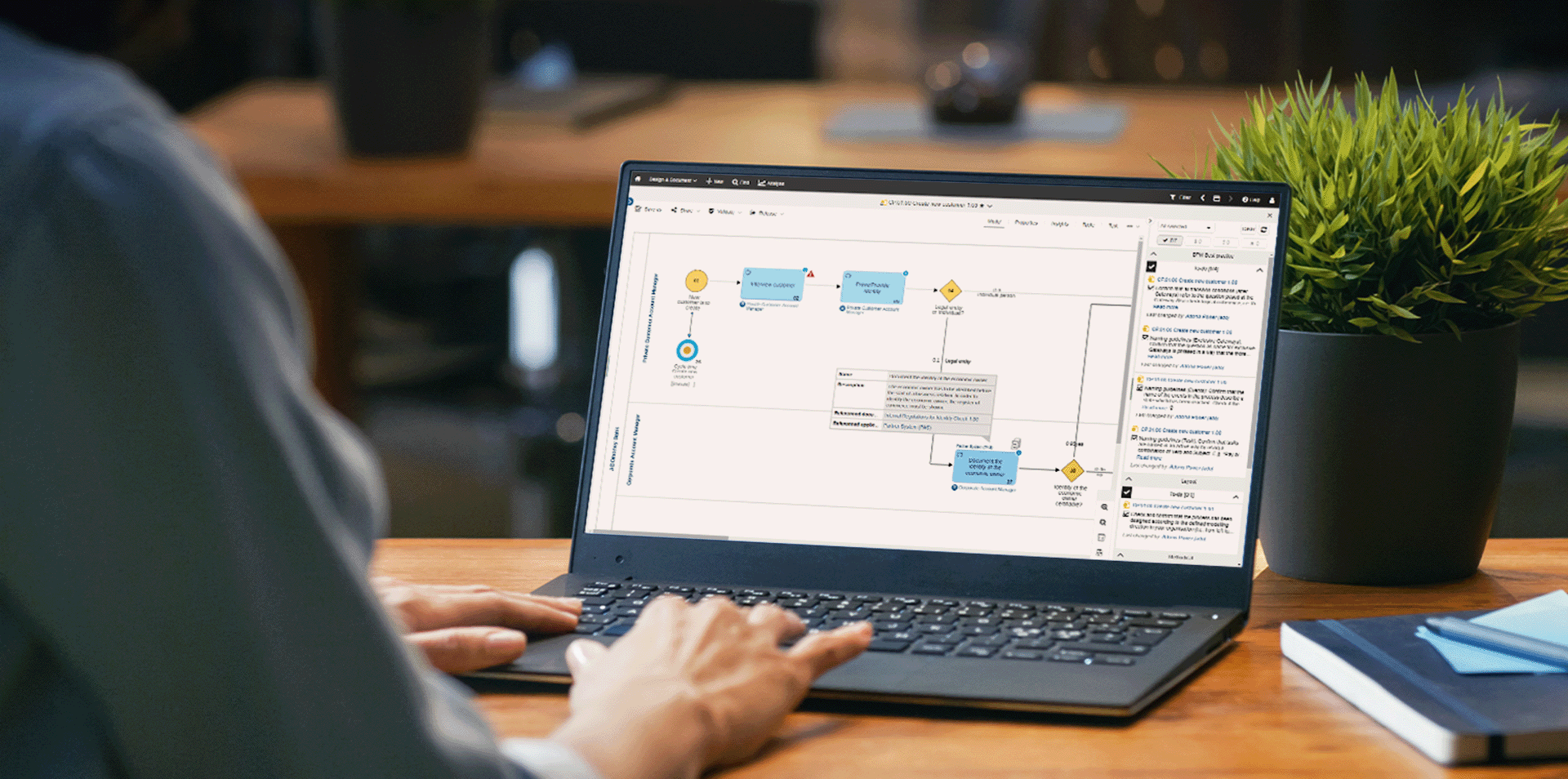
Example of the Process Documentation with ADONIS
Step 6: Visualize the process
Use diagrams or process models to improve clarity and communication. Visual representations make responsibilities, handovers, and dependencies easier to understand across different stakeholders.
Step 7: Define related assets and information
Link relevant assets to the process, such as documents, IT systems, roles, or applications. This provides context and helps users understand how the process is supported in practice.
Step 8: Validate and review the documentation
Review the documented process with relevant stakeholders to ensure accuracy, completeness, and alignment with modeling standards. Validation increases acceptance and helps identify gaps early.
Step 9: Publish and maintain the documentation
Make the process documentation accessible to all relevant users and define how it will be reviewed and updated over time. Regular maintenance is essential to keep documentation aligned with real-world execution.
Why this 9-step approach works
Each step builds on the previous one and ensures that process documentation is structured, understandable, and sustainable. Skipping steps often leads to documentation that is either too detailed, too abstract, or quickly outdated.

Common process documentation challenges and mistakes
Even well-structured documentation initiatives often fail. Not because documentation is unnecessary, but because recurring pitfalls are overlooked.
In practice, most documentation problems fall into a few recurring patterns:
-
documenting without a clear purpose
-
capturing too much detail too early
-
documenting how processes should work instead of how they actually work
-
lacking clear ownership and maintenance responsibility
Addressing these issues early is essential to ensure that process documentation remains usable and trusted over time.
For a detailed breakdown of these pitfalls and practical guidance on how to avoid them, see our dedicated article on business process documentation mistakes and how to avoid them.
Tools and software for process documentation
The effectiveness of process documentation depends not only on what is documented, but also on how documentation is created, maintained, and governed over time. Different tools support different phases of the documentation lifecycle.
Rather than focusing on individual products, it is more useful to understand which types of tools best support process documentation in practice.
Process modeling and documentation tools
These tools support the structured capture and visualization of business processes. They help ensure consistency, enable version control, and make process documentation easier to understand across teams.
While basic diagramming tools may be sufficient for isolated use cases, organizations documenting processes at scale typically require centralized repositories, modeling standards, and governance mechanisms.
Process modeling and documentation tools
These tools support the structured capture and visualization of business processes. They help ensure consistency, enable version control, and make process documentation easier to understand across teams.
While basic diagramming tools may be sufficient for isolated use cases, organizations documenting processes at scale typically require centralized repositories, modeling standards, and governance mechanisms.
Collaboration and knowledge management tools
Collaboration platforms and knowledge bases help make process documentation accessible to a wider audience. They support sharing, feedback, and continuous updates, ensuring that documentation remains visible and usable in daily work.
On their own, however, these tools usually lack the structure needed to manage process logic, dependencies, and ownership consistently.
Process management platforms
Process management platforms combine documentation, governance, and continuous improvement in a single environment. They allow organizations to link processes with roles, systems, controls, and related assets, creating a holistic view of how work is performed.
This integrated approach is particularly valuable when process documentation is used for compliance, audits, or improvement initiatives across the organization.
Choosing the right tool
No tool can compensate for unclear objectives or poor documentation practices. Tools should always be selected based on the intended use of the documentation, the required level of detail, and the organization’s process maturity.
For organizations looking to professionalize process documentation at scale, integrated process management platforms such as ADONIS provide a structured and sustainable foundation, supporting documentation, governance, and continuous improvement in one environment.
Wrapping up
Process documentation is not about creating documents for their own sake — it is about establishing a shared, reliable understanding of how work is done. When processes are clearly documented, organizations reduce dependency on individual knowledge and create a stable foundation for consistency, improvement, and compliance.
Throughout this guide, we’ve shown what process documentation is, why it matters in practice, who should be involved, and how to document processes step by step using a structured approach. Treated as a living asset rather than a one-time project, process documentation becomes a powerful enabler of operational clarity and long-term performance.
With clear ownership, the right level of detail, and suitable tools in place, organizations can turn process documentation into a practical resource that supports daily execution and evolves alongside their processes.




Already got our weekly updates?