Enterprise ArchitEcture

Found this helpful? Share it with peers.
Introduction
Enterprise Architecture has a reputation for being complex and technical, something reserved for specialists with the right modeling background. That reputation doesn’t have to hold.
When EA is made simple and practical, it stops being an expert-only discipline. It turns into a shared way for teams to understand how the organization works and shape where it’s headed, together. Instead of living in diagrams and documentation, EA becomes a tool for real decision-making and collaboration.
This blog walks you through how to make it work in practice, from keeping the architecture simple enough to build to putting it in front of the people who actually rely on it. See how enterprise architecture becomes something the whole organization can work with.
EA Should Be Simple, Not Complex
At its core, enterprise architecture is about understanding how a business works and how technology supports it. That’s a straightforward premise, but in many organizations the execution drifts away from it. Models grow too large and terminology gets too technical. The group of people who can actually work with the architecture shrinks down to a handful of specialists.
The costs show up in familiar ways. Business teams disengage because the material was never built with them in mind, and when IT teams do work with it, they often read the same model differently depending on who’s asking. Decisions end up getting made elsewhere, in meetings and spreadsheets that never reference the architecture at all, and it sits there as documentation instead of something people actually use to decide.
None of that is what EA is supposed to do. Simplified, it opens back up to everyone who has a stake in where the organization is headed, not just the people who built the model.
Lean EA: Start Small, Stay Practical, Grow Over Time
Making that architecture usable again starts with a lean approach. Lean EA means modeling only what the organization actually needs, built around essential building blocks like capabilities, applications, and processes rather than an attempt to capture everything at once. Clarity takes priority over completeness. What gets left out matters as much as what gets included, because every additional layer of detail is one more thing standing between the model and the people who need to use it.
That restraint pays off in two ways. Organizations don’t have to wait until a “perfect model” is finished before getting any value out of it. Insights start flowing as soon as the essential structure is in place, and the architecture grows step by step as the organization matures, without a rebuild every time priorities shift. It does only what creates value right now and extends from there once the organization is ready for more.
Hint: Learn how to apply Lean Enterprise Architecture using ADOIT and ArchiMate to create clear architecture models quickly and efficiently
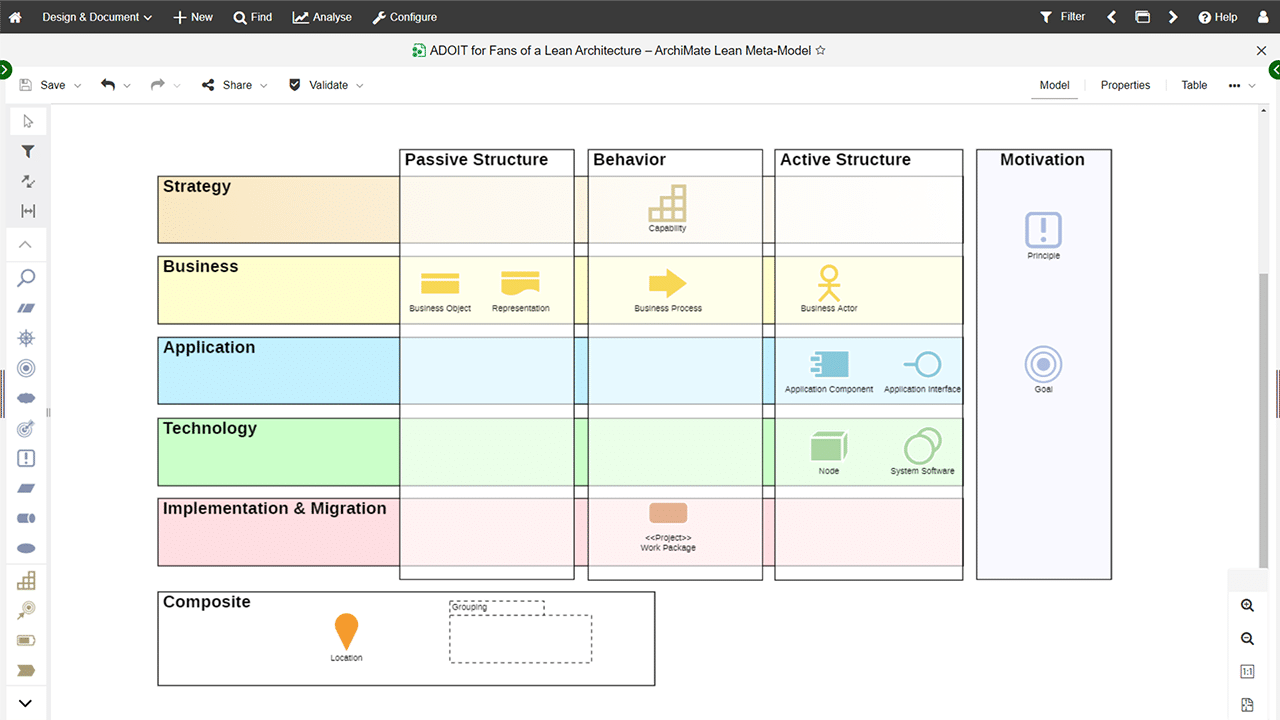
ArchiMate MetaModel – Lean & Beginner Friendly
Workspaces: Making EA a Team Effort
A lean model is still just a model until people outside the architecture team can put it to use. That’s the gap workspaces are built to close, turning the architecture into something collaborative and structured around real business questions instead of abstract diagrams. Non-experts can follow what’s happening without a modeling background, and the whole thing stays oriented toward action rather than piling up as more documentation. Instead of asking people to interpret a complex model on their own, workspaces guide them through specific decision contexts:
- What should we invest in first?
- Which capabilities need improvement?
- Which applications should we modernize or replace?
- Where are we overspending?
Working through questions like these changes what EA actually is for the people involved. It stops being something people look at from a distance and turns into something they work on together. Business stakeholders can contribute alongside IT teams and architects, none of them needing deep modeling knowledge to do it, because everyone works from the same structured information.
That shared footing closes gaps in alignment and cuts down on misunderstandings. Decisions stay transparent, because everyone can see the same information a decision was based on instead of hearing about it after the fact.
Hint: Discover how workspaces help you structure architecture content, share insights, and align teams around business capabilities, applications, and processes.
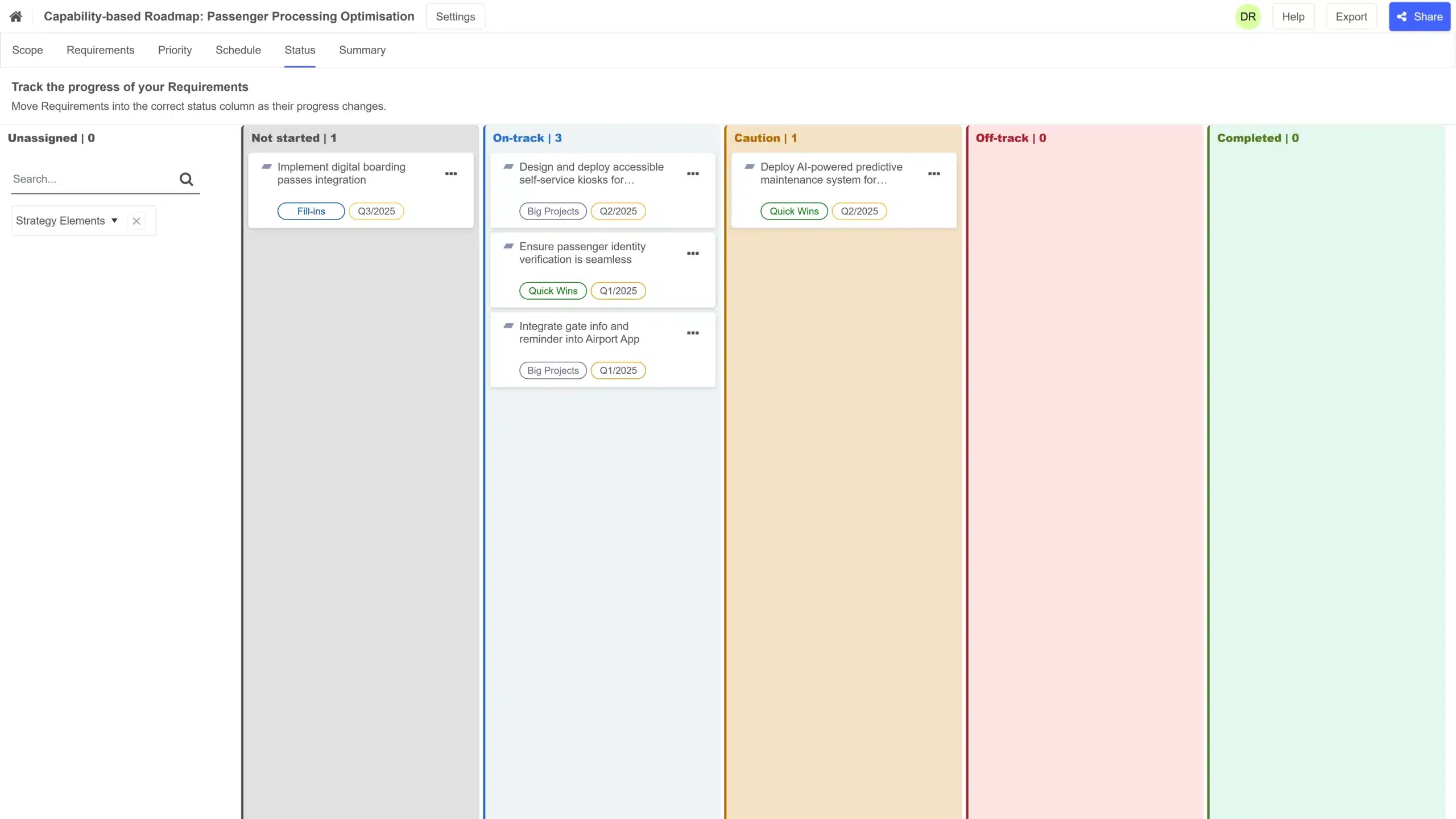
Collaborative Roadmapping in ADOIT Workspaces
From Decisions to Futures: Why Scenario Planning Matters
Transparent, collaborative decisions aren’t automatically the right ones. Once EA is simple and shared, a different question takes over: how do you know a decision made today still holds up once it plays out? That’s what scenario planning in enterprise architecture is built to answer.
Every significant change carries consequences that aren’t obvious at the point of decision. Updating an application can ripple across multiple processes, and replacing a system can change costs and operations in ways that only show up later. Changing a single capability can influence several downstream systems most people in the room haven’t even thought to check. The effects are real, they’re just not visible yet when the decision gets made.
Scenario planning addresses that by letting organizations explore multiple possible futures before committing to change. Instead of asking what should we do, the question becomes what happens if we do A, B, or C instead. That shift lets teams model different alternatives and compare their impact side by side. Trade-offs across business, IT, and cost get weighed before anything is locked in, so the decision rests on evidence instead of assumptions about how things will probably play out.
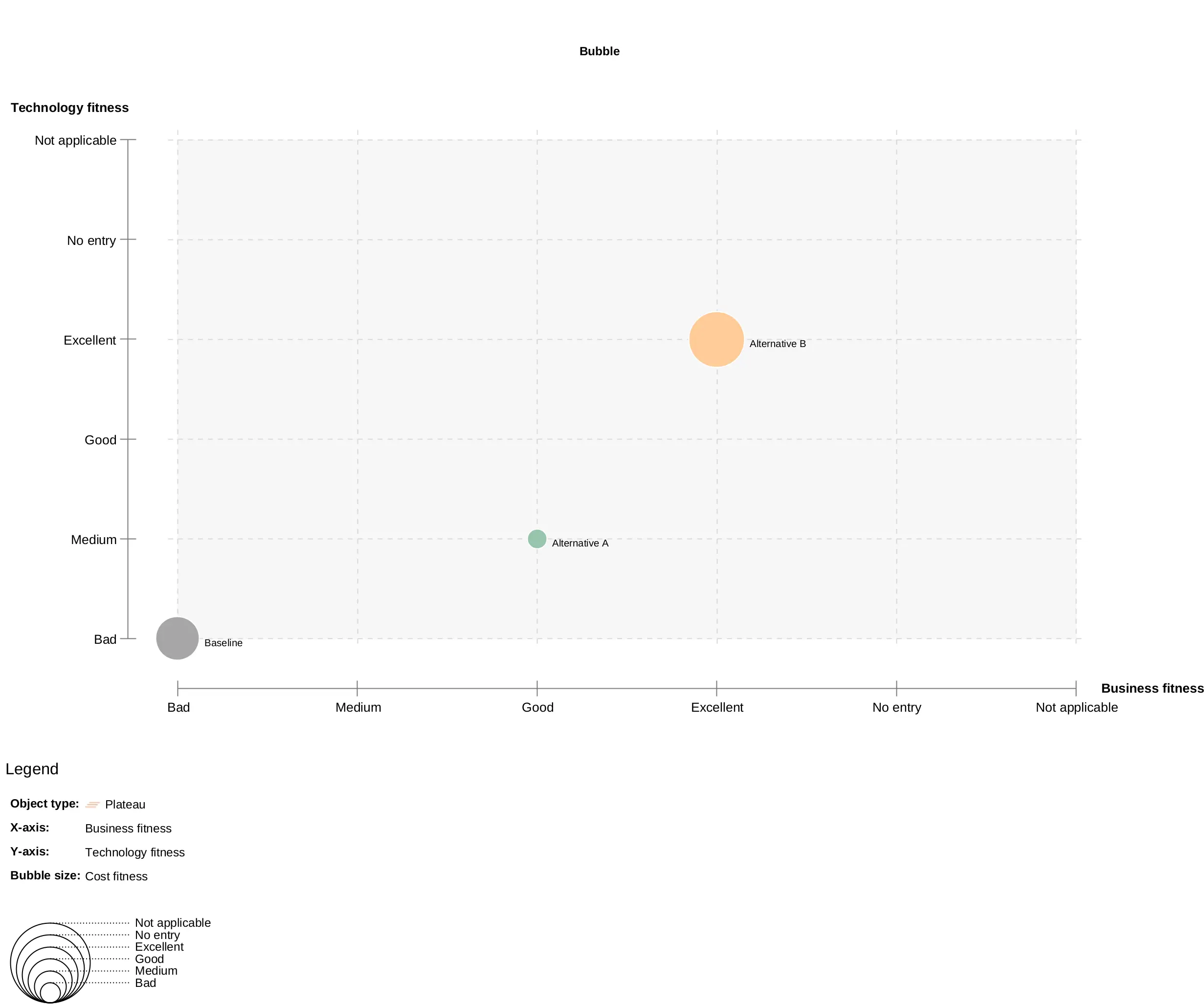
Scenario Comparison across Business and IT Fitness in ADOIT
The Core Idea Behind Scenario Planning
That process follows a simple logic. It starts with the current architecture as a baseline, the real, existing state of the organization rather than an idealized one. From there, something has to trigger the need for change. Sometimes it’s cost pressure or outdated systems, and sometimes it’s a broader strategic transformation the organization has already committed to.
Once the trigger is clear, alternative future scenarios get built, each one representing a different possible decision or direction. Every alternative is then assessed against the same set of criteria:
- business value
- technology fit
- cost implications
- risk and complexity
Scenarios get compared side by side once that evaluation is done, and the most suitable future state gets picked from the comparison rather than a gut call. What comes out the other end is a decision people actually understand, with consequences that are visible well before anything gets implemented.
Hint: See how scenario planning enables teams to analyze future states, reduce risk, and confidently plan transformations — all within a lean and practical EA approach.
How Everything Fits Together
Run together, Lean EA, workspaces, and scenario planning form one continuous loop, where each piece changes what the next is working with.
A lean architecture gives workspaces something usable to build decisions on, instead of a model too dense for anyone outside the architecture team to touch. Those decisions, once workspaces surface them, are exactly what scenario planning needs to test, since there’s now a concrete choice on the table rather than an abstract what if. And what scenario planning reveals feeds straight back into the baseline. The architecture absorbs it as another small update rather than a full redesign, which is what staying lean was for in the first place.
Understand the architecture → collaborate on decisions → explore future scenarios → make informed choices, and then the cycle runs again as the organization changes.
Summary
Enterprise architecture earns its value the moment it starts helping people make better decisions together. Getting there doesn’t call for an expert vocabulary or a specialist’s screen, just an architecture people can actually use.
A lean foundation keeps that architecture usable. Workspaces put it in the hands of the people making the decisions, and scenario planning shows them what those decisions lead to before anything gets locked in. That combination is what EA was always meant to be, a practical way to connect business and IT, built on clarity instead of guesswork.




Already got our weekly updates?