BUSINESS PROCESS MANAGEMENT

Found this helpful? Share it with peers.
A claims handler opens the damage report attached to an email and types the figures into the claims system. No automation checklist would pick that step, because the input is unstructured and the next decision depends on a written policy. Yet it’s the kind of step where an AI agent can pay off.
That’s the profile to look for when you identify AI use cases in business processes. An AI use case is a step where an AI agent takes over or prepares work by reading unstructured input and applying a written policy to cases that vary. Classic automation covers the opposite, steps with fixed rules and structured data.
AI budgets are easy to approve. Results are harder to prove, and they depend on finding those steps. Organizations tend to plan AI from the top, starting with strategy and infrastructure. Yet Deloitte finds that readiness is lowest in the people and processes where AI actually has to work. [1]
AI use cases don’t start in the strategy deck. They start in steps like the one on the claims desk.
Why Classic Automation Criteria Aren’t Enough for AI
Because AI creates value inside processes, the search for use cases starts there, with the processes that cost the most time and money. The first instinct is to reuse the checklist organizations already apply when they select the right processes for their automation initiative.
Rule-Based vs. Judgment-Based Tasks
For classic, rule-based automation, years of practice point to the same six criteria.
-
High volume and repetition. The same task runs many times, and the more often it runs, the faster automation pays back its setup effort.
-
A stable, standardized process. The steps are the same from case to case and rarely change, so a workflow stays valid for months at least.
-
Structured, digital input. Data arrives in form fields. A system can read a field directly, but it can’t make sense of a scanned letter or an email.
-
Clear rules. If the decision can be written down as “if this, then that,” nobody needs to use judgment and a machine can follow it without deviating.
-
Few exceptions. Unusual cases are rare enough to hand to a person, so automating them wouldn’t pay off.
-
Error-prone manual work. People type in data or copy it between systems. Automation removes most of that typing, along with the typos and missing fields that cause rework.
A task that meets these criteria is a safe candidate for automation, and AI can make that kind of automation smarter. AI agents widen the field: they can also take on steps these criteria rule out, such as reading documents or making judgment calls based on policies written in prose. Those steps are often the reason a whole process gets written off for automation, even when most of its other steps would pass.
What an AI Agent Adds Beyond Rules
Rule-based automation such as robotic process automation (RPA) works where every case follows the same fields and rules. It fixes problems like missed steps and stuck approvals, which preconfigured input fields and automated handovers prevent. Once a step needs someone to interpret what’s in front of them, the rule-based approach reaches its limit.
AI starts at that point, and an AI agent goes further than a single AI function. A single function reads one document or answers one question. An agent plans the actions within a task and uses the organization’s systems as its tools, then hands over a prepared case.
That difference counts most where people switch between the ERP and the CRM, or search email and shared folders, to put one case together. Each system the agent uses needs an interface with access rights and someone to maintain it, so integration cost grows with every system involved.
AI still can’t be applied blindly. Each step needs a second set of criteria to decide whether it belongs with an agent or with a person.
What Criteria Indicate a Strong AI Use Case?
Five criteria show whether a step that classic automation rejects is worth handing to an AI agent.
Unstructured Data in Documents and Emails
The step depends on reading documents or free text before anything else can happen.
Look for: people opening attachments and copying values into a system, or sorting incoming requests by hand.
An AI agent reads the input and turns the information the process needs into structured data, so the next step can start. McKinsey describes a financial-services company that deployed agents to extract complex financial information, which reduced the human validation required. Begin with documents that arrive often and look alike, such as supplier invoices or claim forms that come in as PDFs or email attachments. Keep a person checking the extracted values until the results prove reliable. [2]
Decisions With Variability or Pattern Recognition
Cases differ from one another, but the rules for handling them are documented in manuals or SOPs, even if only in prose.
Look for: decisions that experienced colleagues make by recognizing a pattern.
An AI agent applies the same policy to every case and compares each one with similar cases. Cases that don’t fit the pattern are flagged for a person.
High Knowledge Dependency (Expert Bottlenecks)
Experts spend a large share of their time preparing cases the same way, and queues form in front of them.
Look for: how much of an expert’s day goes into collecting and checking documents and writing summaries, compared with the actual decision.
An AI agent takes over the preparation and drafts a recommendation with its reasoning, while the expert keeps the decision. This works best when experts help shape how the agent prepares their cases. They’re the ones who have to trust its work.
Error Tolerance and Need for Human Review
A wrong result can be spotted quickly and corrected at low cost.
Look for: what happens if the result is wrong, and how long it takes a person to notice.
A wrongly extracted invoice date is obvious at a glance. A wrongly approved payment may already be gone by the time anyone notices. How cheap and quick it is to catch an error decides how much the agent may do on its own, which the autonomy levels below set out.
Data Availability and Quality
The rules and examples the agent needs are documented and reachable, and the data it works with is cleared for use.
Look for: knowledge that exists only in people’s heads or in scattered files, and data you may not be allowed to use.
An AI agent can only follow rules that are written down and that it can access. Quality matters as much as availability, because the agent applies an outdated policy just as reliably as a current one. Access also needs permission. Before the pilot starts, clarify which customer data the agent may use, and for what purpose.
A step that meets several of these criteria is worth testing. A step that meets none of them is better left to classic automation or to people.
What Signals That AI Is the Wrong Choice?
Not every task benefits from an AI agent, and the reason usually lies in what happens around the step. Four signals speak against handing a step to an agent.
-
Deterministic rules. Where rules are fixed and input is structured, classic automation already does the job. McKinsey notes that in low-variance, highly standardized workflows, agents based on nondeterministic models can add more complexity and uncertainty than value. [2]
-
Results that can’t be undone. A released payment or a decided loan application can’t be taken back once it’s out.
-
High stakes per case. If one wrong result could cost more than the agent saves across hundreds of cases, the risk-return ratio speaks against AI.
-
New or emotional cases. A case with no precedent gives the agent no pattern to follow. A customer who is angry or worried wants to be heard, and that takes a person who can listen and respond.
The last check is practical. If someone has to review and correct every result, or the team doesn’t trust the rules and data the agent works with, people end up doing the work twice and the agent saves no time.
Most of these signals limit what the agent does without ruling it out. Two levels of autonomy cover the range.
-
Let it run. The case is routine, and a mistake does little harm and is easy to spot. The agent completes the step on its own, with spot checks.
-
Let it prepare. A mistake would be serious, or the decision can’t be undone. The agent prepares the case, and a person reviews it and has the final word.
Whatever the level, a person stays accountable for the result, even when an agent does the work.
How to Assess Your Process Landscape for AI Potential, Step by Step
Whether a step makes a good AI use case can only be judged at process level, together with the people who run it. A documented process landscape turns the criteria into a repeatable AI use case assessment in four steps.
-
Build the process inventory. Screen every process in the landscape at once, so candidates don’t have to be debated one by one. Compare processes by how often they run and how standardized they are. Then look at how much unstructured input and policy-based judgment each one involves.
-
Score the steps against the criteria. Go down to the steps of the most promising processes and review each one with the employees who perform it. Remove or simplify steps that add no value before anything else, because automating an inefficient process, with rules or with AI, only makes the inefficiency run faster. Then decide whether each remaining step needs a person. If it doesn’t, rate it against the criteria to decide whether classic rules can handle it or it needs an agent.
-
Prioritize by impact and feasibility. Impact comes from the time and money a step costs today. Feasibility depends on the integration effort and the time people need to check results. The running cost per case and the effort of fixing wrong results belong in the same ROI calculation.
-
Run a pilot and measure it. Run one or two pilots and measure what actually changed. Process mining on the execution data shows how processing time and rework moved, and each round of results feeds the next screening.
The criteria assessment matrix below is a starting point for step 2.
| Criterion | Question to ask | Points toward an AI agent | Points away from an AI agent |
|---|---|---|---|
| Unstructured data | Does the step depend on reading documents or free text? | Recurring, similar documents such as invoices or claim forms | Data already arrives in structured fields |
| Variability | Do cases differ while the handling rules are written down? | Experienced colleagues decide by recognizing a pattern | Fixed if-then rules, or cases with no precedent |
| Knowledge dependency | How much expert time goes into preparing cases? | Queues form in front of experts who prepare cases the same way | The decision itself takes most of the expert’s time |
| Error tolerance | How quickly is a wrong result spotted and corrected? | Errors are obvious and cheap to fix | Results can’t be undone |
| Data availability | Are the rules and data documented and cleared for use? | Policies are documented and current | Knowledge exists only in people’s heads, or data use isn’t permitted |
The strongest workflows rarely hand everything to one technology. McKinsey describes the goal as a targeted mix of rule-based systems and AI agents, with people working alongside them. [2]
How a Process Model Makes AI Use Cases Visible
Without a process model, AI tends to arrive as a tool looking for tasks. Many organizations roll out general-purpose assistants across departments, and this horizontal approach has its merits. Employees get used to AI and find their own quick wins, and high usage gives middle management visible progress to report to the board. McKinsey finds that the resulting productivity gains are real but spread thinly across employees, so they rarely show up in top- or bottom-line results. [3]
Read more on why AI and automation initiatives struggle without a strong process foundation.
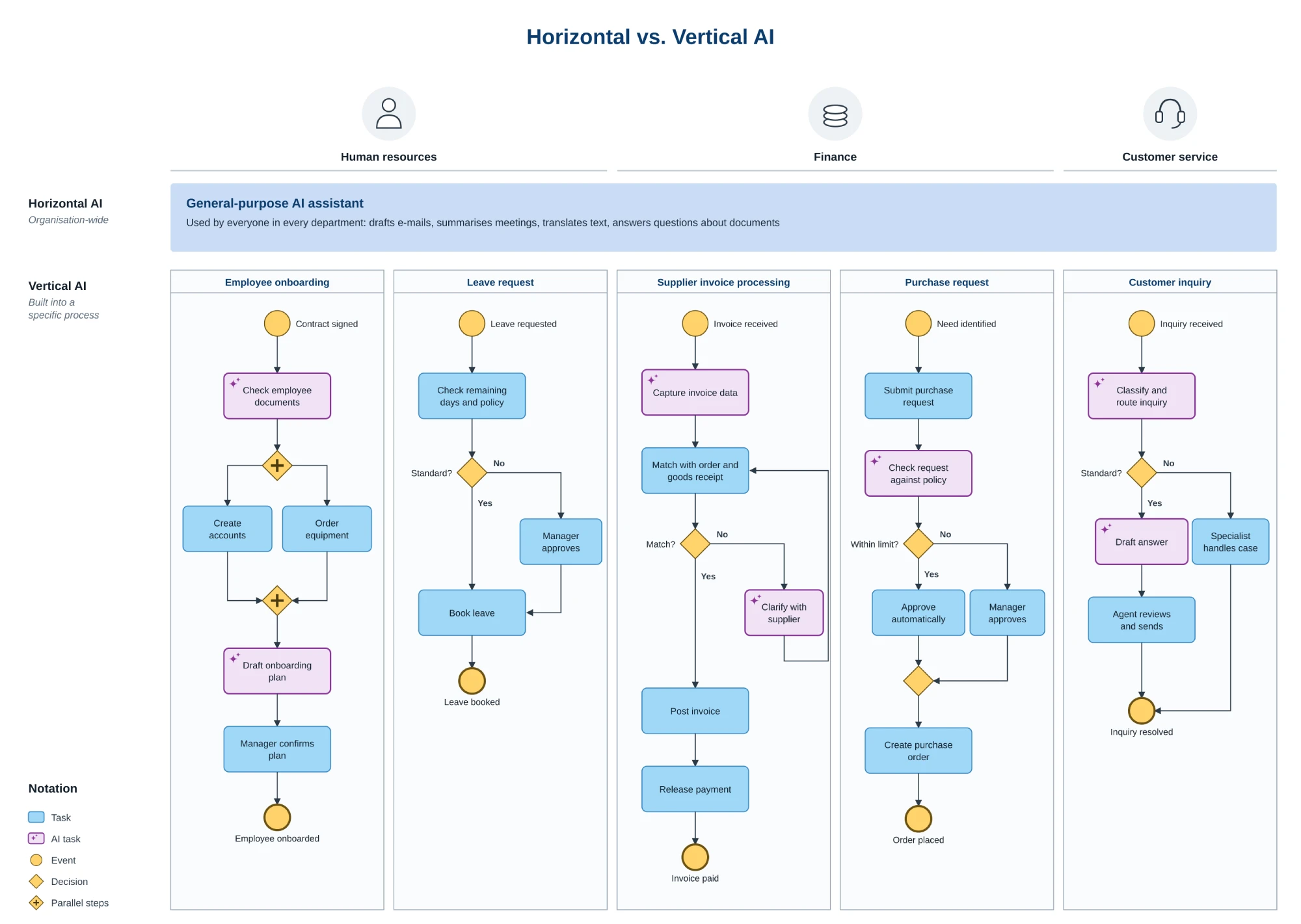
Horizontal vs. vertical AI in everyday business processes
A process model reverses that order. It describes the business from the process landscape down to individual tasks, including how employees carry out each one, so the candidates for AI become visible before anyone picks a tool. McKinsey names mapping processes and identifying user pain points as an important starting point for redesigning workflows around agents. Pain points and non-value-adding work show up at the step where they occur, and each one can be checked against the criteria. AI built into a specific process this way is vertical AI: every step it touches is defined before the agent starts. [2]
The model also carries over into execution. Open standards such as the Model Context Protocol (MCP) let agents execute tasks in the order described in your process model, so the agent you selected follows the same rules and policies as your people.
In ADONIS: the process landscape and its models in ADONIS are the basis for spotting where AI fits, and ADONIS Process Automation turns the selected processes into workflows where people and AI agents work together under shared rules.
The value of an AI agent is decided before it runs, at the moment someone chooses the step it will take over.
Summary
An AI use case is a process step with unstructured input or policy-based judgment, the kind of work the classic automation checklist rejects. Unstructured data and decisions that vary from case to case are the clearest signs of a strong candidate, while error tolerance and data availability decide how much the agent may do on its own. Deterministic rules and results that can’t be undone argue against an agent. So do high stakes per case and new or emotional cases.
The assessment starts with the whole process landscape and then moves to individual steps, scored with the employees who perform them. Candidates are prioritized by impact and feasibility before one or two go into a pilot. Throughout, the process model shows where AI fits before anyone chooses a tool.
Follow Up Questions
Source Directory



Already got our weekly updates?