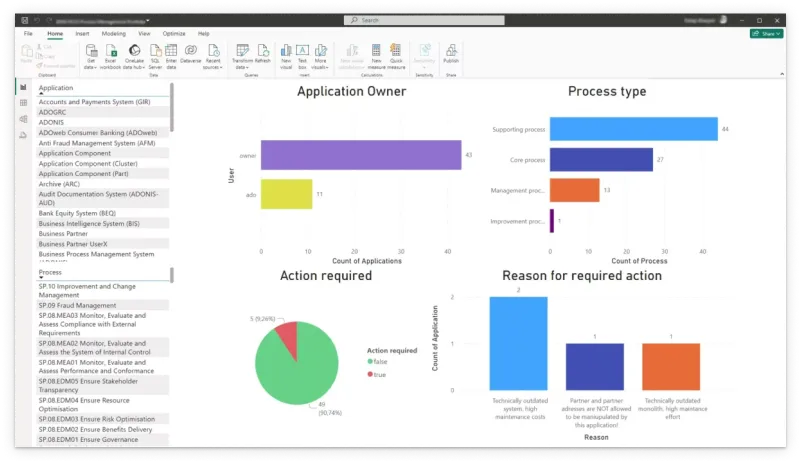
Unlock the power of data-driven decision-making with ADOIT Connect for Power BI. Effortlessly visualize, analyze, and share Enterprise Architecture insights across your organization using the predefined Power BI template.

Business need

Enterprise Architecture Essentials

Reporting

Data-Driven Decision-Making

Categories

ADOIT

Template

Requirements

ADOIT 15 or higher

    Take advantage of predefined queries and visuals to jumpstart your reporting

    Features that make all the difference.
    Custom, Ready to Use EA Dashboards

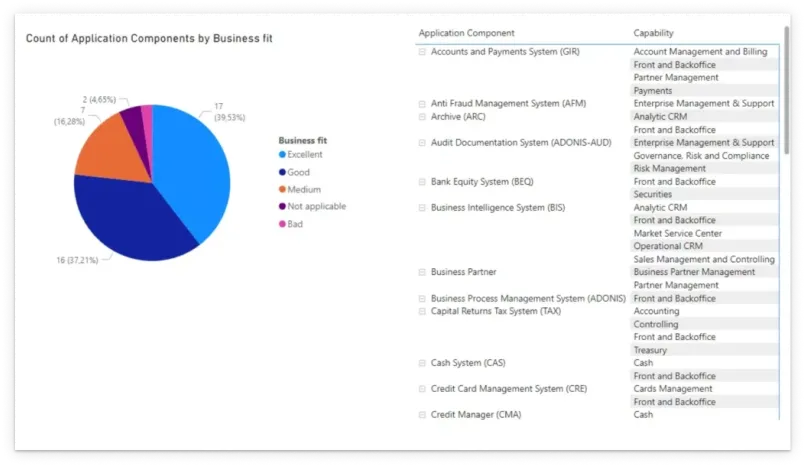
    Leverage the predefined Power BI template to generate tailored reports instantly. Retrieve objects and relationships from ADOIT, visualize them and adapt dashboards to fit your organization’s needs.

    Seamless Integration & One-Click Sharing

    Connect ADOIT to Power BI via the standard REST API for a smooth data flow. Embed reports in MS Teams or PowerPoint and ensure all stakeholders—from IT to business leaders—have the latest EA insights at their fingertips.

    Why ADOIT Connect for Power BI?

    Live Data Access

    Use the data from ADOIT to create your own reports.

    Customizable Dashboards

    Use the template to retrieve objects and relationships from your ADOIT repository. Use the sample charts as a reference to develop and customize your own charts.

    One-Click Sharing

    Present the latest EA insights effortlessly across your company.

    Get Your Power BI Template for Free on GitHub

    Accelerate your workflow, boost your EA portfolio, download the Power BI template.

    This module is essential for the following use cases.

    Strategic Planning

    The add-on enables Strategic Planning by providing decision-makers with real-time, data-driven insights into their Enterprise Architecture. By leveraging Power BI dashboards, organizations can analyze trends, track key metrics, and ensure that strategic initiatives align with enterprise objectives.

    And accelerates these EA Solutions:

    Application Portfolio Management

    Enterprise Architecture Design

    Capability Based Planning

    This module is an extension for our holistic EA suite

    Details on the latest release.

    Documentation / Helpful links
    ADOIT Connect for Power BI

    Real-time insights into your Enterprise Architecture.

    Supported Languages

    English

    Compatibility
    • ADOIT 15.0 or higher
    • Power BI Desktop 2.9 or higher

    Frequently Asked Questions (FAQ)

    To connect your Power BI template to your ADOIT installation, follow the steps outlined here.

    ADOIT Connect for Power BI supports Power BI desktop installation variants.

    No additional training in Power BI or ADOIT is needed in order to fully operate the service.
    The template includes functions that simplify the retrieval of objects and relationships from ADOIT. It also provides sample charts for demonstration purposes. You can easily use these functions to extract additional data and, based on that data, create your own charts using standard Power BI features. If you need assistance with customizing the template, feel free to contact us. Please note that consultation services may incur additional costs.

    Gain Insights from Real-World Applications

    ADOIT Connect for Power BI enables business and IT teams to align on strategies and EA insights with real-time, customized reports.

    ADOIT Connect for Power BI enables business and IT teams to align on strategies and EA insights with real-time, customized reports.

    Christoph Moser

    Dr. Christoph Moser

    Product Manager,
    ADOIT

    Seamless EA Reporting with Power BI

    Gain real-time insights and present your Enterprise Architecture data effortlessly.

    Explore more EA modules.